> ## Documentation Index
> Fetch the complete documentation index at: https://docs.keephq.dev/llms.txt
> Use this file to discover all available pages before exploring further.
# Alert Sidebar
The Alert Sidebar in Keep provides a detailed view of a selected alert, offering in-depth context and information to aid in alert management and resolution. This feature is designed to give users a comprehensive understanding of the alert without leaving the main interface.
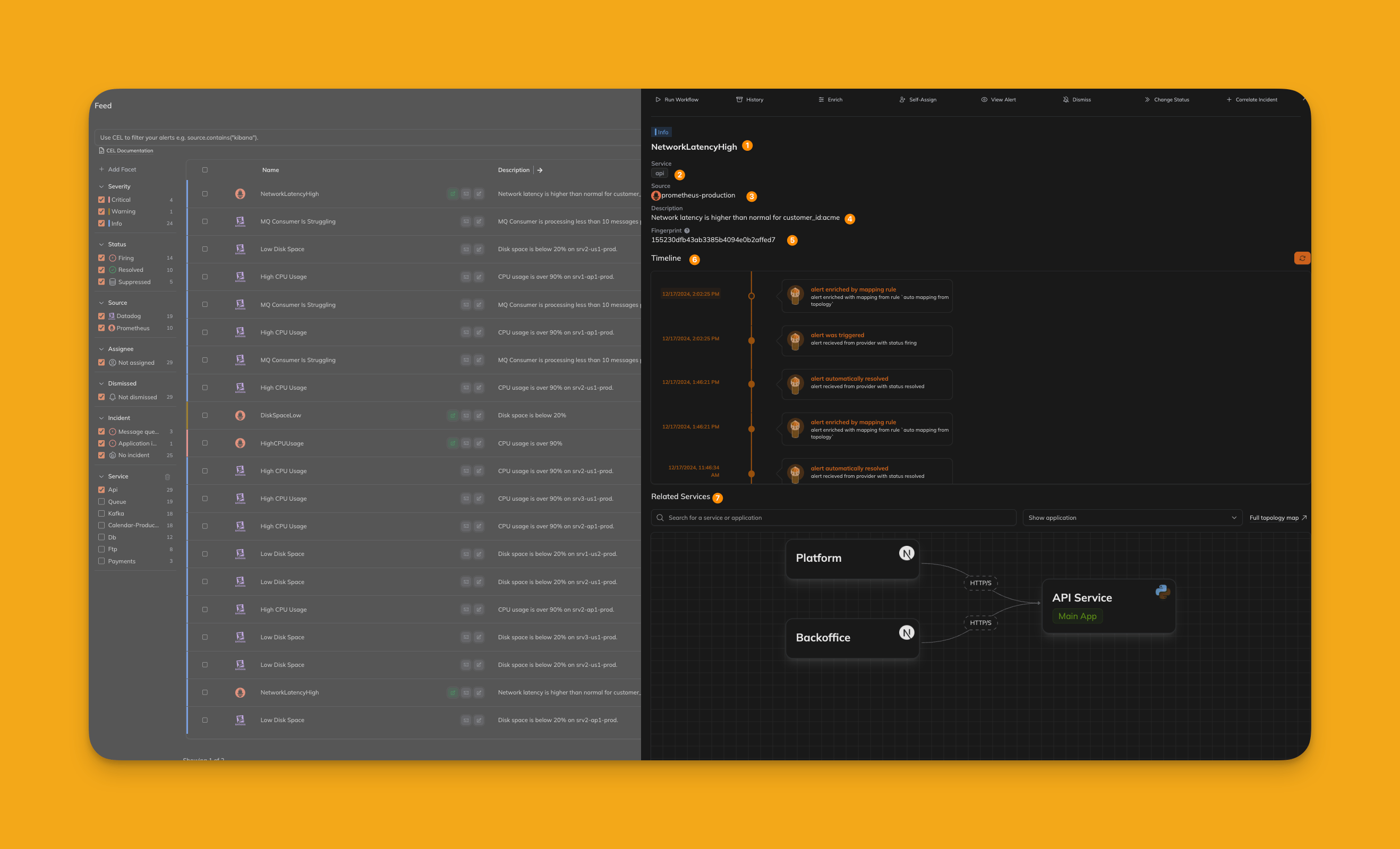 ### (1) Alert Name
Displays the name of the alert, which typically summarizes the issue or event being reported. This is the primary identifier for the alert.
### (2) Alert Related Service
Shows the service associated with the alert. This helps teams quickly understand which part of the infrastructure or application is affected.
### (3) Alert Source
Indicates the source of the alert, such as the monitoring tool or system that generated it (e.g., Prometheus, Datadog). This provides context on where the alert originated.
### (4) Alert Description
A detailed description of the alert, including specifics about the issue. This section helps provide a deeper understanding of what triggered the alert.
### (5) Alert Fingerprint
A unique identifier for the alert. The fingerprint is used to correlate alerts and track their lifecycle across systems.
### (6) Alert Timeline
Displays a chronological history of the alert, including when it was created, acknowledged, updated, or resolved. The timeline provides insights into how the alert has been managed.
### (7) Alert Topology View
Offers a visual representation of the alert's impact on the system's topology. This view helps identify affected components and their relationships to other parts of the infrastructure.
***
### (1) Alert Name
Displays the name of the alert, which typically summarizes the issue or event being reported. This is the primary identifier for the alert.
### (2) Alert Related Service
Shows the service associated with the alert. This helps teams quickly understand which part of the infrastructure or application is affected.
### (3) Alert Source
Indicates the source of the alert, such as the monitoring tool or system that generated it (e.g., Prometheus, Datadog). This provides context on where the alert originated.
### (4) Alert Description
A detailed description of the alert, including specifics about the issue. This section helps provide a deeper understanding of what triggered the alert.
### (5) Alert Fingerprint
A unique identifier for the alert. The fingerprint is used to correlate alerts and track their lifecycle across systems.
### (6) Alert Timeline
Displays a chronological history of the alert, including when it was created, acknowledged, updated, or resolved. The timeline provides insights into how the alert has been managed.
### (7) Alert Topology View
Offers a visual representation of the alert's impact on the system's topology. This view helps identify affected components and their relationships to other parts of the infrastructure.
***