> ## Documentation Index
> Fetch the complete documentation index at: https://docs.keephq.dev/llms.txt
> Use this file to discover all available pages before exploring further.
# Topology Correlation
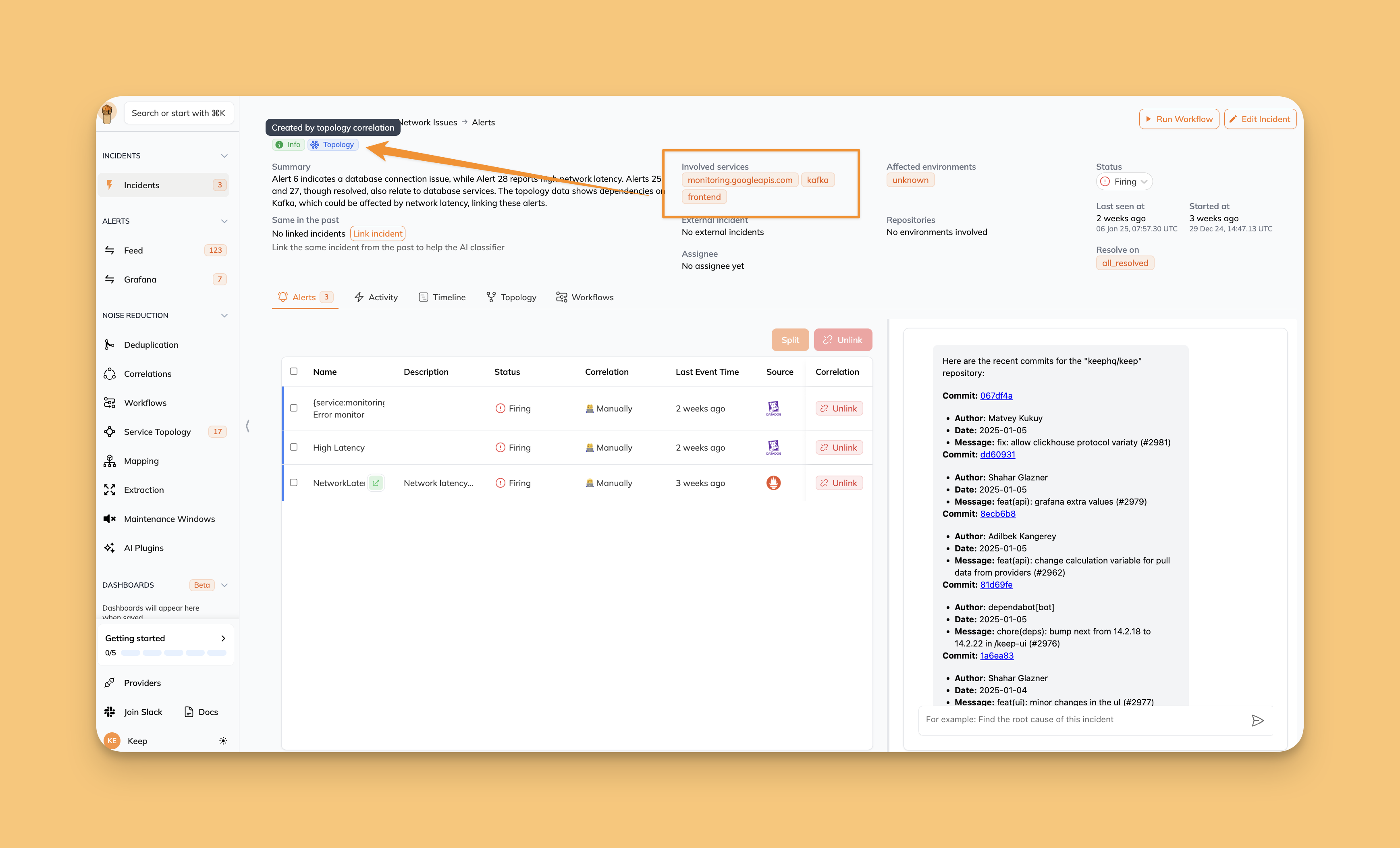
The Topology Processor is a core component of Keep that helps correlate alerts based on your infrastructure's topology, creating meaningful incidents that reflect the relationships between your services and applications.
It automatically analyzes incoming alerts and their relationship to your infrastructure topology, creating incidents when multiple related services or components of an application are affected.
Read more about [Service Topology](/overview/servicetopology).
 The Topology Processor is disabled by default. To enable it, set the
environment variable `KEEP_TOPOLOGY_PROCESSOR=true`.
## How It Works
1. **Service Discovery**: The processor maintains a map of your infrastructure's topology, including:
* Services and their relationships
* Applications and their constituent services
* Dependencies between different components
2. **Alert Processing**: Every few seconds, the processor:
* Analyzes recent alerts
* Maps alerts to services in your topology
* Creates or updates incidents based on application-level impact
3. **Incident Creation**: When multiple services within an application have active alerts:
* Creates a new application-level incident
* Groups related alerts under this incident
* Provides context about the affected application and its services
## Configuration
### Environment Variables
| Variable | Description | Default |
| ------------------------------------------ | --------------------------------------------------- | ------- |
| `KEEP_TOPOLOGY_PROCESSOR` | Enable/disable the topology processor | `false` |
| `KEEP_TOPOLOGY_PROCESSOR_INTERVAL` | Interval for processing alerts (in seconds) | `10` |
| `KEEP_TOPOLOGY_PROCESSOR_LOOK_BACK_WINDOW` | Look back window for alert correlation (in minutes) | `15` |
## Incident Management
### Creation
When the processor detects alerts affecting multiple services within an application:
* Creates a new incident with type "topology"
* Names it "Application incident: {application_name}"
* Automatically confirms the incident
* Links all related alerts to the incident
### Resolution
Incidents can be configured to resolve automatically when:
* All related alerts are resolved
* Specific resolution criteria are met
## Best Practices
1. **Service Mapping**
* Ensure services in alerts match your topology definitions
* Maintain up-to-date topology information
2. **Application Definition**
* Group related services into logical applications
* Define clear service boundaries
3. **Alert Configuration**
* Include service information in your alerts
* Use consistent service naming across monitoring tools
## Example
If you have an application "payment-service" consisting of multiple microservices:
```json theme={null}
{
"application": "payment-service",
"services": ["payment-api", "payment-processor", "payment-database"]
}
```
When alerts come in for both `payment-api` and `payment-database`, the Topology Processor will:
1. Recognize these services belong to the same application
2. Create a single incident for "payment-service"
3. Group both alerts under this incident
4. Provide application-level context in the incident description
## Limitations
* Currently supports only application-based incident creation
* One active incident per application at a time
* Requires service information in alerts for correlation
The Topology Processor is disabled by default. To enable it, set the
environment variable `KEEP_TOPOLOGY_PROCESSOR=true`.
## How It Works
1. **Service Discovery**: The processor maintains a map of your infrastructure's topology, including:
* Services and their relationships
* Applications and their constituent services
* Dependencies between different components
2. **Alert Processing**: Every few seconds, the processor:
* Analyzes recent alerts
* Maps alerts to services in your topology
* Creates or updates incidents based on application-level impact
3. **Incident Creation**: When multiple services within an application have active alerts:
* Creates a new application-level incident
* Groups related alerts under this incident
* Provides context about the affected application and its services
## Configuration
### Environment Variables
| Variable | Description | Default |
| ------------------------------------------ | --------------------------------------------------- | ------- |
| `KEEP_TOPOLOGY_PROCESSOR` | Enable/disable the topology processor | `false` |
| `KEEP_TOPOLOGY_PROCESSOR_INTERVAL` | Interval for processing alerts (in seconds) | `10` |
| `KEEP_TOPOLOGY_PROCESSOR_LOOK_BACK_WINDOW` | Look back window for alert correlation (in minutes) | `15` |
## Incident Management
### Creation
When the processor detects alerts affecting multiple services within an application:
* Creates a new incident with type "topology"
* Names it "Application incident: {application_name}"
* Automatically confirms the incident
* Links all related alerts to the incident
### Resolution
Incidents can be configured to resolve automatically when:
* All related alerts are resolved
* Specific resolution criteria are met
## Best Practices
1. **Service Mapping**
* Ensure services in alerts match your topology definitions
* Maintain up-to-date topology information
2. **Application Definition**
* Group related services into logical applications
* Define clear service boundaries
3. **Alert Configuration**
* Include service information in your alerts
* Use consistent service naming across monitoring tools
## Example
If you have an application "payment-service" consisting of multiple microservices:
```json theme={null}
{
"application": "payment-service",
"services": ["payment-api", "payment-processor", "payment-database"]
}
```
When alerts come in for both `payment-api` and `payment-database`, the Topology Processor will:
1. Recognize these services belong to the same application
2. Create a single incident for "payment-service"
3. Group both alerts under this incident
4. Provide application-level context in the incident description
## Limitations
* Currently supports only application-based incident creation
* One active incident per application at a time
* Requires service information in alerts for correlation