> ## Documentation Index
> Fetch the complete documentation index at: https://docs.keephq.dev/llms.txt
> Use this file to discover all available pages before exploring further.
# FAQ
## FAQ
### 1. "Failed to copy alert/fingerprint. Please check your browser permissions"
Modern browsers block clipboard access from insecure ("http") origins for security reasons.
To confirm the root cause of the issue, check your website settings in the browser:
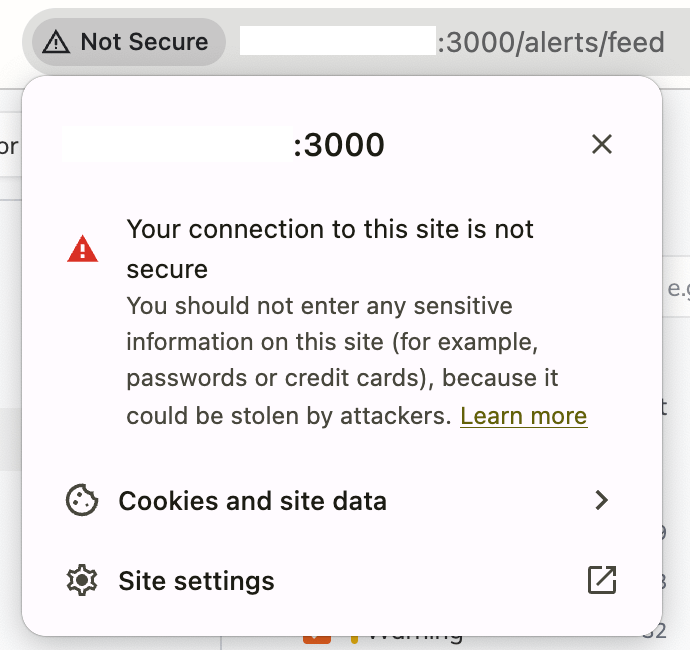 If you see the "Blocked to protect your privacy" message or similar text under clipboard settings, this confirms the error is due to an insecure origin:
 To resolve this:
* For production: Configure HTTPS for your Keep deployment
* For local development: Use "localhost" which browsers treat as a secure origin
* If using a custom domain locally: Enable HTTPS or switch to "localhost"
If you're accessing Keep from a secure origin and still experiencing this issue, please [reach out](https://slack.keephq.dev) to us.
To resolve this:
* For production: Configure HTTPS for your Keep deployment
* For local development: Use "localhost" which browsers treat as a secure origin
* If using a custom domain locally: Enable HTTPS or switch to "localhost"
If you're accessing Keep from a secure origin and still experiencing this issue, please [reach out](https://slack.keephq.dev) to us.