> ## Documentation Index
> Fetch the complete documentation index at: https://docs.keephq.dev/llms.txt
> Use this file to discover all available pages before exploring further.
# Cilium
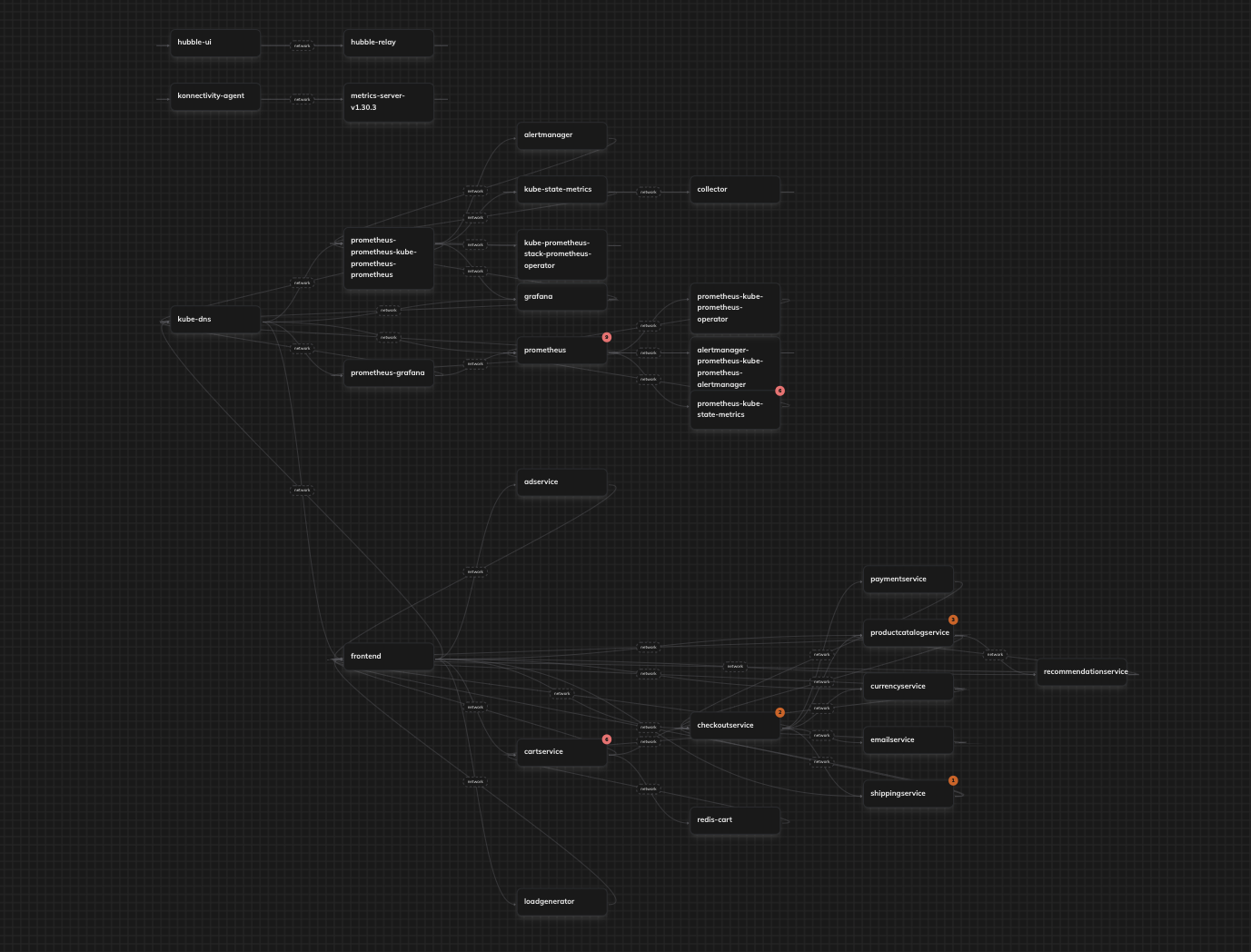
> Cilium provider enables topology discovery by analyzing network flows between services in your Kubernetes cluster using Hubble.
## Authentication
This provider requires authentication.
* **cilium\_base\_endpoint**: The base endpoint of the cilium hubble relay (required: True, sensitive: False)
* **use\_tls**: Connect to the hubble relay over TLS (required: False, sensitive: False)
* **ca\_certificate**: CA certificate (PEM) used to verify the hubble relay server (required: False, sensitive: True)
* **client\_certificate**: Client certificate (PEM) for mutual TLS (required: False, sensitive: True)
* **client\_key**: Client private key (PEM) for mutual TLS (required: False, sensitive: True)
## In workflows
This provider can't be used as a "step" or "action" in workflows. If you want to use it, please let us know by creating an issue in the [GitHub repository](https://github.com/keephq/keep/issues).
## Topology
This provider pulls [topology](/overview/servicetopology) to Keep. It could be used in [correlations](/overview/correlation-topology)
and [mapping](/overview/enrichment/mapping#mapping-with-topology-data), and as a context
for [alerts](/alerts/sidebar#7-alert-topology-view) and [incidents](/overview#17-incident-topology).
## Overview
Cilium provider is in Beta and is not working with authentication yet.
The current way to pull topology data from your kubernetes cluster, is to run:
```bash theme={null}
# hubble-relay usually installed at kube-system, but it depends on your cluster.
kubectl port-forward -n kube-system svc/hubble-relay 4245:80
```
and then use `localhost:4245` to pull topology data.
If you need help with connecting Cilium provider, [reach out](https://slack.keephq.dev).
The Cilium provider leverages Hubble's network flow data to automatically discover service dependencies and build a topology map of your Kubernetes applications.
 ## Authentication Parameters
| Parameter | Description | Example |
| ---------------------- | ----------------------------------------------------------- | ----------------------------- |
| `cilium_base_endpoint` | The base endpoint of the Cilium Hubble relay | `localhost:4245` |
| `use_tls` | Connect to the Hubble relay over TLS | `true` |
| `ca_certificate` | CA certificate (PEM) used to verify the Hubble relay server | `-----BEGIN CERTIFICATE-----` |
| `client_certificate` | Client certificate (PEM) for mutual TLS | `-----BEGIN CERTIFICATE-----` |
| `client_key` | Client private key (PEM) for mutual TLS | `-----BEGIN PRIVATE KEY-----` |
## Outputs
The provider returns topology information including:
* Service names and their dependencies
* Namespace information
* Pod labels and cluster metadata
* Network-based relationships between services
## Service Discovery Logic
The provider identifies services using the following hierarchy:
1. Workload name (if available)
2. Kubernetes labels (`k8s:app=` or `k8s:app.kubernetes.io/name=`)
3. Pod name (stripped of deployment suffixes)
## Requirements
* A running Kubernetes cluster with Cilium installed
* Hubble enabled and accessible via gRPC
* Network visibility (flow logs) enabled in Cilium
## Limitations
* Only captures active network flows between pods
* Service discovery is limited to pods with proper Kubernetes labels
* Requires direct access to the Hubble relay endpoint
## Useful Links
* [Cilium Documentation](https://docs.cilium.io/)
* [Hubble Documentation](https://docs.cilium.io/en/stable/hubble/)
* [Kubernetes Network Policies](https://kubernetes.io/docs/concepts/services-networking/network-policies/)
## Google Kubernetes Engine specific
If you are using a GKE cluster, you cannot connect Keep to the Google-managed hubble-relay directly because:
* hubble-relay operates only in secure mode,
* hubble-relay requires client certificate authentication.
However, Keep does not currently support these features.
To work around this, you can add an NGINX Pod that listens on a plaintext HTTP port and proxies requests to hubble-relay secure port using hubble-relay certificates.
You need a GKE cluster with [dataplane v2](https://cloud.google.com/kubernetes-engine/docs/concepts/dataplane-v2) .
[Dataplane v2 observability](https://cloud.google.com/kubernetes-engine/docs/how-to/configure-dpv2-observability) must be enabled.
Here is an example of running a plaintext NGINX proxy:
```yaml theme={null}
---
apiVersion: v1
kind: ConfigMap
metadata:
name: hubble-relay-insecure-nginx
namespace: gke-managed-dpv2-observability
data:
nginx.conf: |
user nginx;
worker_processes auto;
error_log /dev/stdout notice;
pid /var/run/nginx.pid;
events {
worker_connections 1024;
}
http {
log_format main '$remote_addr - $remote_user [$time_local] "$request" '
'$status $body_bytes_sent "$http_referer" '
'"$http_user_agent" "$http_x_forwarded_for"';
access_log /dev/stdout main;
server {
listen 80;
http2 on;
location / {
grpc_pass grpcs://hubble-relay.gke-managed-dpv2-observability.svc.cluster.local:443;
grpc_ssl_certificate /etc/nginx/certs/client.crt;
grpc_ssl_certificate_key /etc/nginx/certs/client.key;
grpc_ssl_trusted_certificate /etc/nginx/certs/hubble-relay-ca.crt;
}
}
}
---
kind: Deployment
apiVersion: apps/v1
metadata:
name: hubble-relay-insecure
namespace: gke-managed-dpv2-observability
labels:
k8s-app: hubble-relay-insecure
app.kubernetes.io/name: hubble-relay-insecure
app.kubernetes.io/part-of: cilium
spec:
replicas: 1
selector:
matchLabels:
k8s-app: hubble-relay-insecure
template:
metadata:
labels:
k8s-app: hubble-relay-insecure
app.kubernetes.io/name: hubble-relay-insecure
app.kubernetes.io/part-of: cilium
spec:
securityContext:
fsGroup: 1000
seccompProfile:
type: RuntimeDefault
containers:
- name: frontend
image: nginx:alpine
ports:
- name: http
containerPort: 80
volumeMounts:
- name: hubble-relay-insecure-nginx-conf
mountPath: /etc/nginx/
readOnly: true
- name: hubble-relay-client-certs
mountPath: /etc/nginx/certs/
readOnly: true
volumes:
- configMap:
name: hubble-relay-insecure-nginx
name: hubble-relay-insecure-nginx-conf
- name: hubble-relay-client-certs
projected:
defaultMode: 0400
sources:
- secret:
name: hubble-relay-client-certs
items:
- key: ca.crt
path: hubble-relay-ca.crt
- key: tls.crt
path: client.crt
- key: tls.key
path: client.key
---
kind: Service
apiVersion: v1
metadata:
name: hubble-relay-insecure
namespace: gke-managed-dpv2-observability
labels:
k8s-app: hubble-relay-insecure
app.kubernetes.io/name: hubble-relay-insecure
app.kubernetes.io/part-of: cilium
spec:
type: ClusterIP
selector:
k8s-app: hubble-relay-insecure
ports:
- name: http
port: 80
targetPort: 80
```
Now you can connect Keep with google-managed hubble-relay by adding Cilium provider using `hubble-relay-insecure.gke-managed-dpv2-observability:80` address.
## Authentication Parameters
| Parameter | Description | Example |
| ---------------------- | ----------------------------------------------------------- | ----------------------------- |
| `cilium_base_endpoint` | The base endpoint of the Cilium Hubble relay | `localhost:4245` |
| `use_tls` | Connect to the Hubble relay over TLS | `true` |
| `ca_certificate` | CA certificate (PEM) used to verify the Hubble relay server | `-----BEGIN CERTIFICATE-----` |
| `client_certificate` | Client certificate (PEM) for mutual TLS | `-----BEGIN CERTIFICATE-----` |
| `client_key` | Client private key (PEM) for mutual TLS | `-----BEGIN PRIVATE KEY-----` |
## Outputs
The provider returns topology information including:
* Service names and their dependencies
* Namespace information
* Pod labels and cluster metadata
* Network-based relationships between services
## Service Discovery Logic
The provider identifies services using the following hierarchy:
1. Workload name (if available)
2. Kubernetes labels (`k8s:app=` or `k8s:app.kubernetes.io/name=`)
3. Pod name (stripped of deployment suffixes)
## Requirements
* A running Kubernetes cluster with Cilium installed
* Hubble enabled and accessible via gRPC
* Network visibility (flow logs) enabled in Cilium
## Limitations
* Only captures active network flows between pods
* Service discovery is limited to pods with proper Kubernetes labels
* Requires direct access to the Hubble relay endpoint
## Useful Links
* [Cilium Documentation](https://docs.cilium.io/)
* [Hubble Documentation](https://docs.cilium.io/en/stable/hubble/)
* [Kubernetes Network Policies](https://kubernetes.io/docs/concepts/services-networking/network-policies/)
## Google Kubernetes Engine specific
If you are using a GKE cluster, you cannot connect Keep to the Google-managed hubble-relay directly because:
* hubble-relay operates only in secure mode,
* hubble-relay requires client certificate authentication.
However, Keep does not currently support these features.
To work around this, you can add an NGINX Pod that listens on a plaintext HTTP port and proxies requests to hubble-relay secure port using hubble-relay certificates.
You need a GKE cluster with [dataplane v2](https://cloud.google.com/kubernetes-engine/docs/concepts/dataplane-v2) .
[Dataplane v2 observability](https://cloud.google.com/kubernetes-engine/docs/how-to/configure-dpv2-observability) must be enabled.
Here is an example of running a plaintext NGINX proxy:
```yaml theme={null}
---
apiVersion: v1
kind: ConfigMap
metadata:
name: hubble-relay-insecure-nginx
namespace: gke-managed-dpv2-observability
data:
nginx.conf: |
user nginx;
worker_processes auto;
error_log /dev/stdout notice;
pid /var/run/nginx.pid;
events {
worker_connections 1024;
}
http {
log_format main '$remote_addr - $remote_user [$time_local] "$request" '
'$status $body_bytes_sent "$http_referer" '
'"$http_user_agent" "$http_x_forwarded_for"';
access_log /dev/stdout main;
server {
listen 80;
http2 on;
location / {
grpc_pass grpcs://hubble-relay.gke-managed-dpv2-observability.svc.cluster.local:443;
grpc_ssl_certificate /etc/nginx/certs/client.crt;
grpc_ssl_certificate_key /etc/nginx/certs/client.key;
grpc_ssl_trusted_certificate /etc/nginx/certs/hubble-relay-ca.crt;
}
}
}
---
kind: Deployment
apiVersion: apps/v1
metadata:
name: hubble-relay-insecure
namespace: gke-managed-dpv2-observability
labels:
k8s-app: hubble-relay-insecure
app.kubernetes.io/name: hubble-relay-insecure
app.kubernetes.io/part-of: cilium
spec:
replicas: 1
selector:
matchLabels:
k8s-app: hubble-relay-insecure
template:
metadata:
labels:
k8s-app: hubble-relay-insecure
app.kubernetes.io/name: hubble-relay-insecure
app.kubernetes.io/part-of: cilium
spec:
securityContext:
fsGroup: 1000
seccompProfile:
type: RuntimeDefault
containers:
- name: frontend
image: nginx:alpine
ports:
- name: http
containerPort: 80
volumeMounts:
- name: hubble-relay-insecure-nginx-conf
mountPath: /etc/nginx/
readOnly: true
- name: hubble-relay-client-certs
mountPath: /etc/nginx/certs/
readOnly: true
volumes:
- configMap:
name: hubble-relay-insecure-nginx
name: hubble-relay-insecure-nginx-conf
- name: hubble-relay-client-certs
projected:
defaultMode: 0400
sources:
- secret:
name: hubble-relay-client-certs
items:
- key: ca.crt
path: hubble-relay-ca.crt
- key: tls.crt
path: client.crt
- key: tls.key
path: client.key
---
kind: Service
apiVersion: v1
metadata:
name: hubble-relay-insecure
namespace: gke-managed-dpv2-observability
labels:
k8s-app: hubble-relay-insecure
app.kubernetes.io/name: hubble-relay-insecure
app.kubernetes.io/part-of: cilium
spec:
type: ClusterIP
selector:
k8s-app: hubble-relay-insecure
ports:
- name: http
port: 80
targetPort: 80
```
Now you can connect Keep with google-managed hubble-relay by adding Cilium provider using `hubble-relay-insecure.gke-managed-dpv2-observability:80` address.