> ## Documentation Index
> Fetch the complete documentation index at: https://docs.keephq.dev/llms.txt
> Use this file to discover all available pages before exploring further.
# SignalFX
> SignalFX provider allows you get alerts from SignalFX Alerting via webhooks.
## Overview
SignalFX Provider enriches your monitoring and alerting capabilities by seamlessly integrating with SignalFX Alerting via webhooks. This integration allows you to receive alerts directly from SignalFX, ensuring you're promptly informed about significant events and metrics within your infrastructure.
Key Features:
* Webhook Auto-Instrumentation: Automatically configures Keep as a Webhook Integration within SignalFX, subscribing to all available SignalFX Detectors and Rules for comprehensive monitoring.
* Manual and Automated Subscription Management: Provides flexibility in adding Keep as a subscriber to new Detectors either manually or by re-running the "setup webhook" feature from the UI for effortless maintenance.
For further information or assistance, feel free to reach out on our Slack Community.
## Connecting with the Provider
There are three approaches to connect with SignalFX:
* Push (Manually) - Install Keep as a Webhook Integration.
* Push (Auto Instrumentation) - Let Keep instrument itself as a webhook integration and subscribe to your SignalFx detectors.
* Pull - Keep will pull alerts from SignalFx.
The recommended way to install SignalFx is through Push (Auto Instrumentation). With this approach, you benefit from the advantages of the Push approach, which include more context (since SignalFx sends more context on Webhooks) and more real-time alerts, combined with the convenience of Pull integration (just supply credentials, and Keep will do the rest).
In the following sections, we will elaborate on each approach.
### Push (Manually)
For more information about how SignalFx integrates with Webhooks, you can read [https://docs.splunk.com/observability/en/admin/notif-services/webhook.html#webhook2](https://docs.splunk.com/observability/en/admin/notif-services/webhook.html#webhook2)
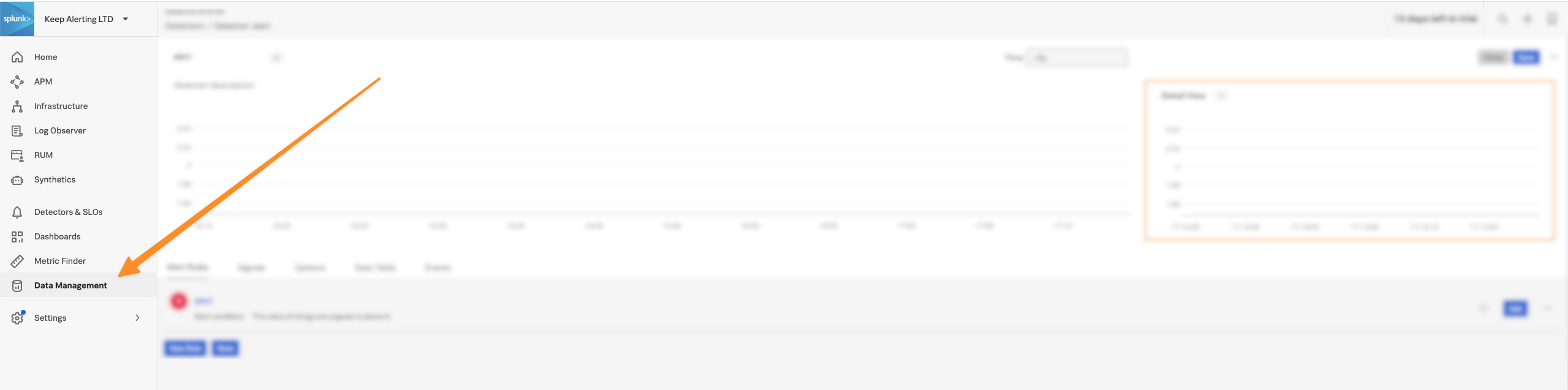
1. From your SignalFx console, click on "Data Management":
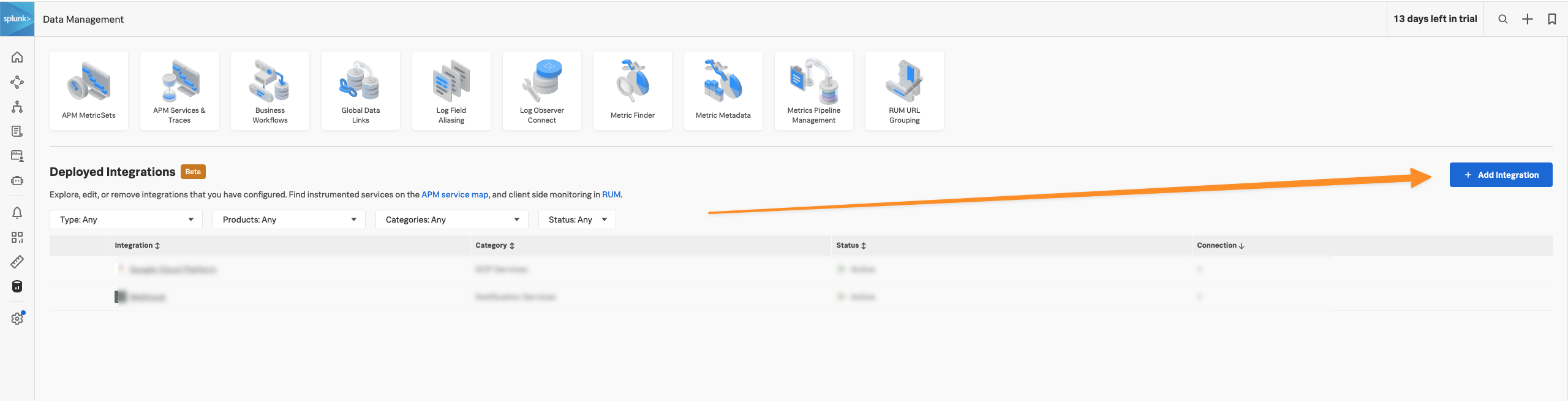
 2. Click on "+ Add Integration"
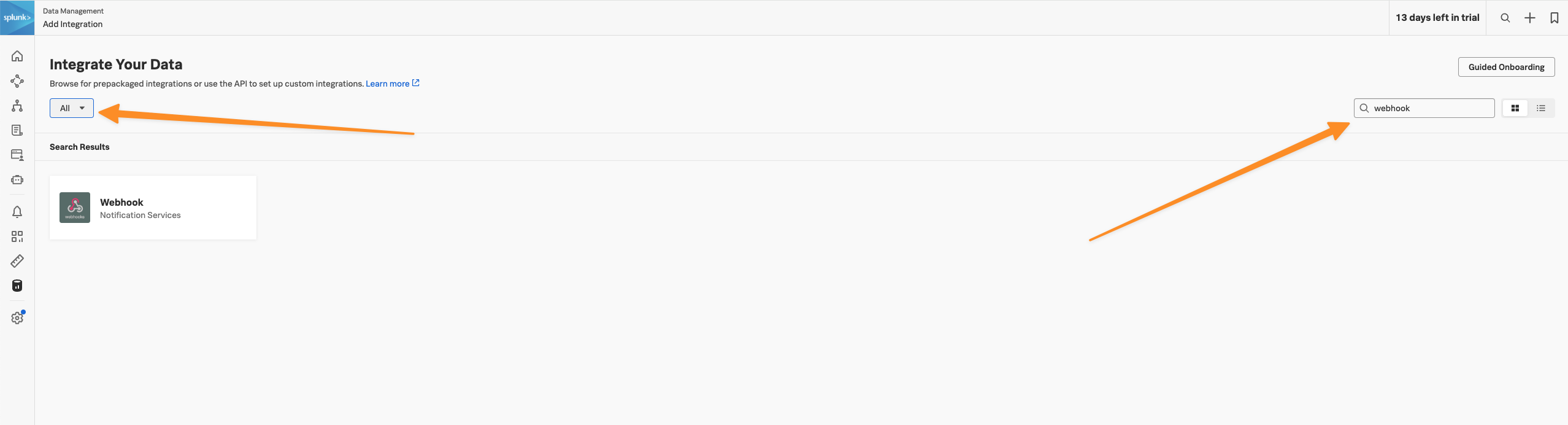
 3. Change the "By Use Case" select to "All" and filter "webhook":
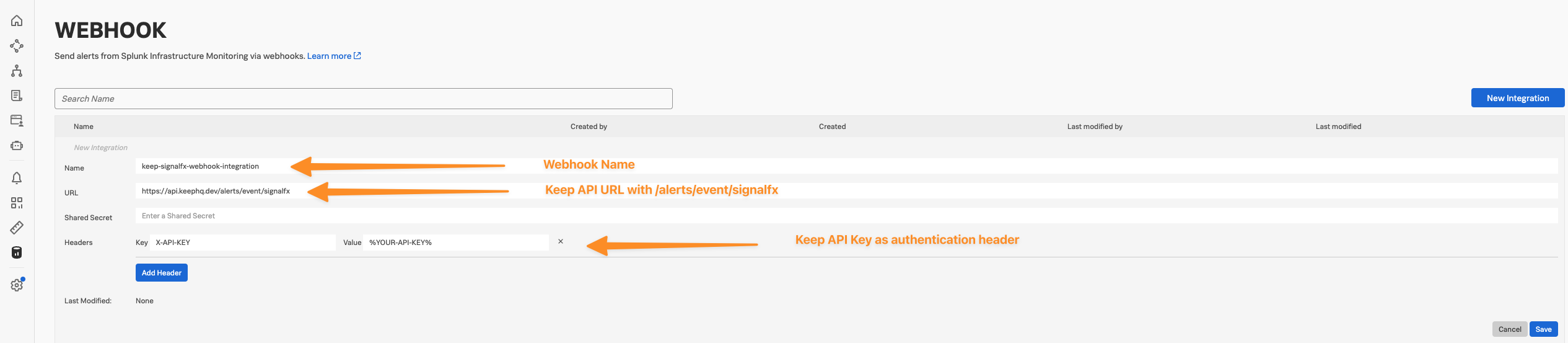
 4. Click on the Webhook tile and fill the following details:
 5. Now, go to Detectors & SLOs page:
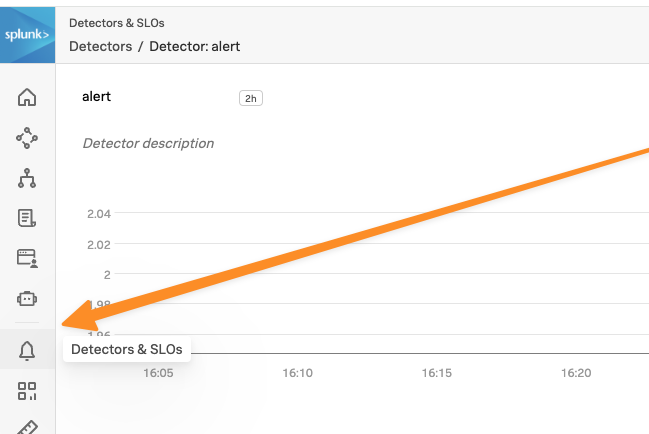 6. For every Detector and Rule, add Keep as Alert recipient:
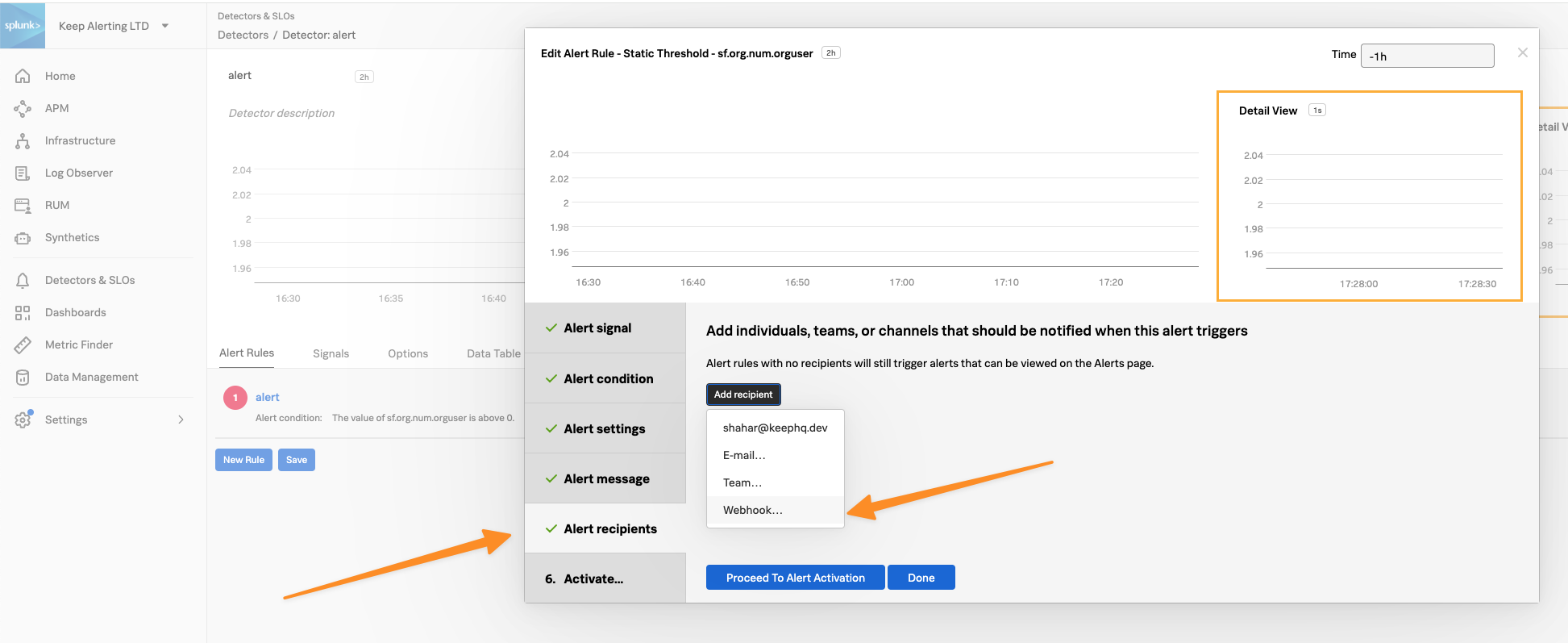 ### Push (Auto Instrumentation)
With this approach:
1. Keep installs itself as Webhook Integration.
2. Keep iterates all Detectors and Rules, and will add itself as a subscriber
The downside of this approach is that you'll need email/password of a user with admin role. This is due to SignalFx limitation on installing integrations: You can read more here - [https://dev.splunk.com/observability/reference/api/integrations/latest#endpoint-create-integration](https://dev.splunk.com/observability/reference/api/integrations/latest#endpoint-create-integration)
### Push (Auto Instrumentation)
With this approach:
1. Keep installs itself as Webhook Integration.
2. Keep iterates all Detectors and Rules, and will add itself as a subscriber
The downside of this approach is that you'll need email/password of a user with admin role. This is due to SignalFx limitation on installing integrations: You can read more here - [https://dev.splunk.com/observability/reference/api/integrations/latest#endpoint-create-integration](https://dev.splunk.com/observability/reference/api/integrations/latest#endpoint-create-integration)
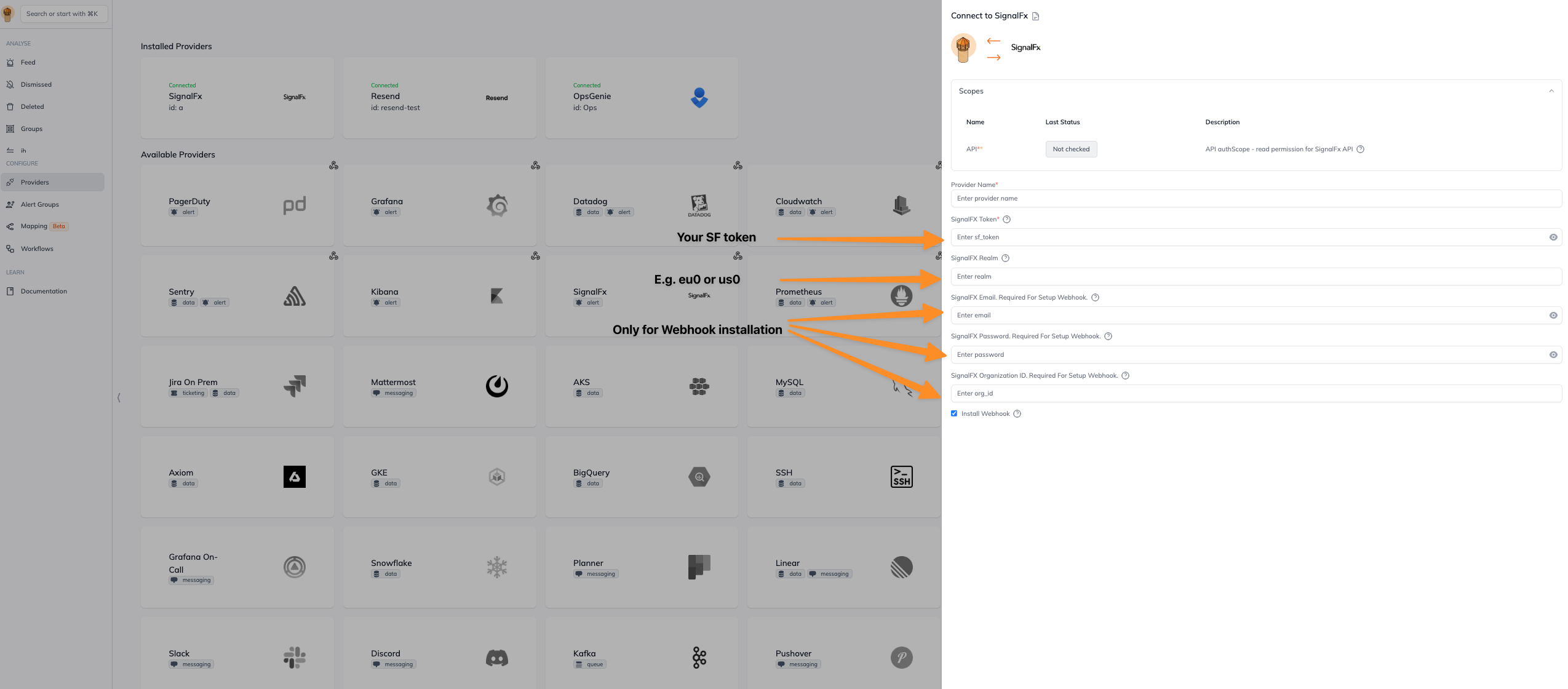
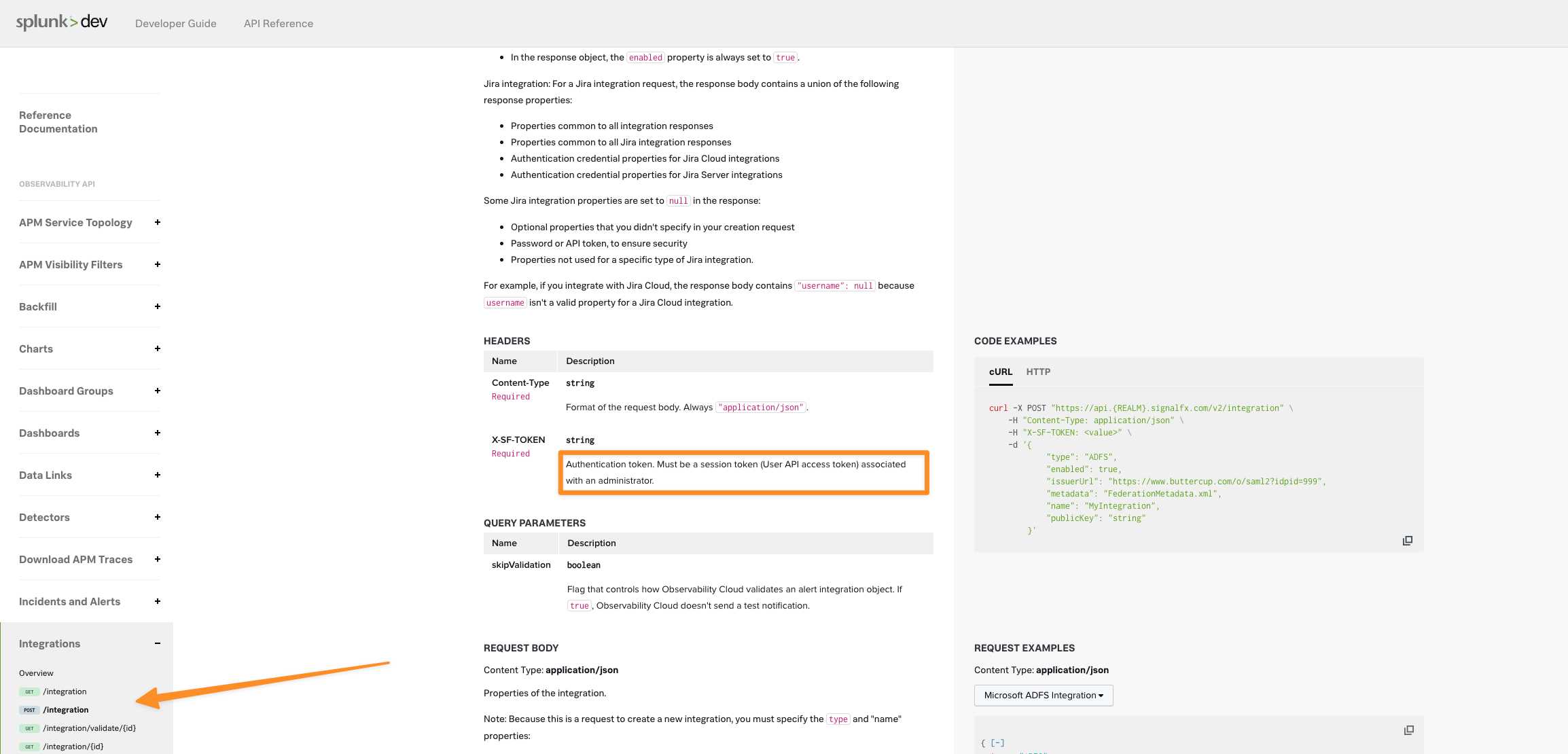 To install Keep with Push (auto instrumentation):
1. SF token with read permissions - go to Settings -> Access Tokens -> New Token
To install Keep with Push (auto instrumentation):
1. SF token with read permissions - go to Settings -> Access Tokens -> New Token
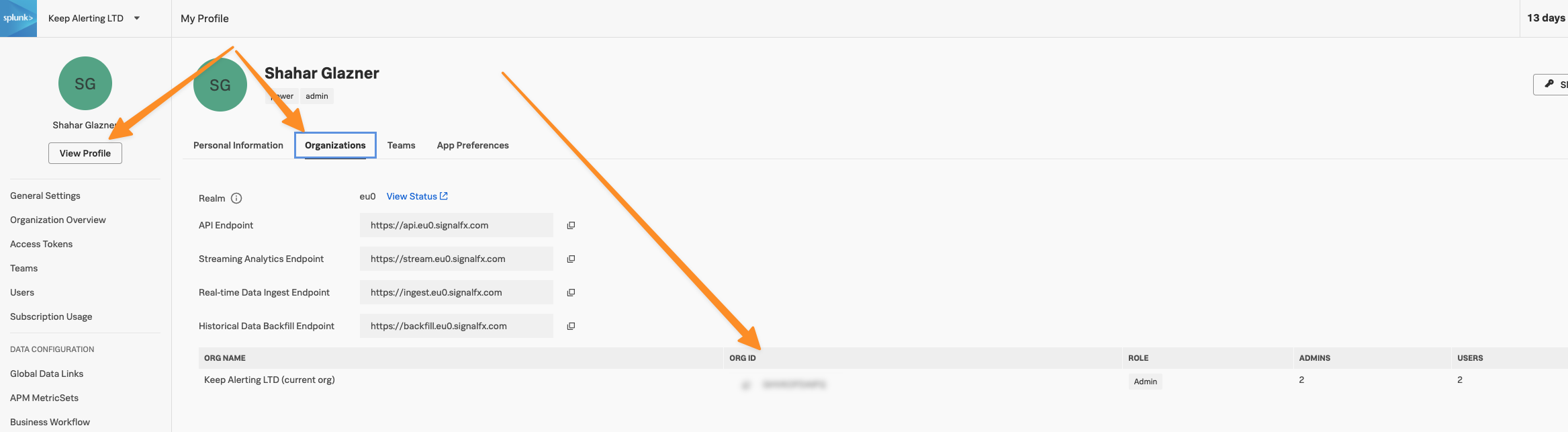
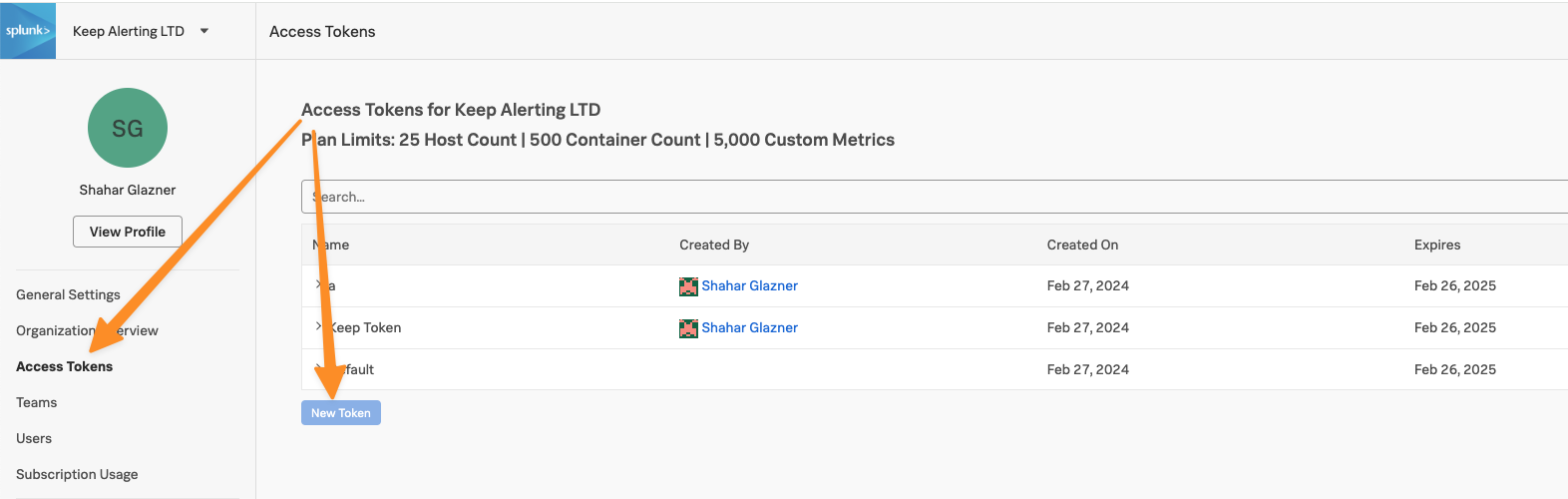 2. email/password for a user with admin role - this will be used only for creating the Webhook Integration
3. orgid - this will be used only for creating the Webhook Integration
2. email/password for a user with admin role - this will be used only for creating the Webhook Integration
3. orgid - this will be used only for creating the Webhook Integration
 After we have all what we need, go to Keep and install the SignalFx provider:
 ### Pull
With this approach, Keep will pull alerts from SignalFx every time you refresh the console page.
1. SF token with read permissions - go to Settings -> Access Tokens -> New Token
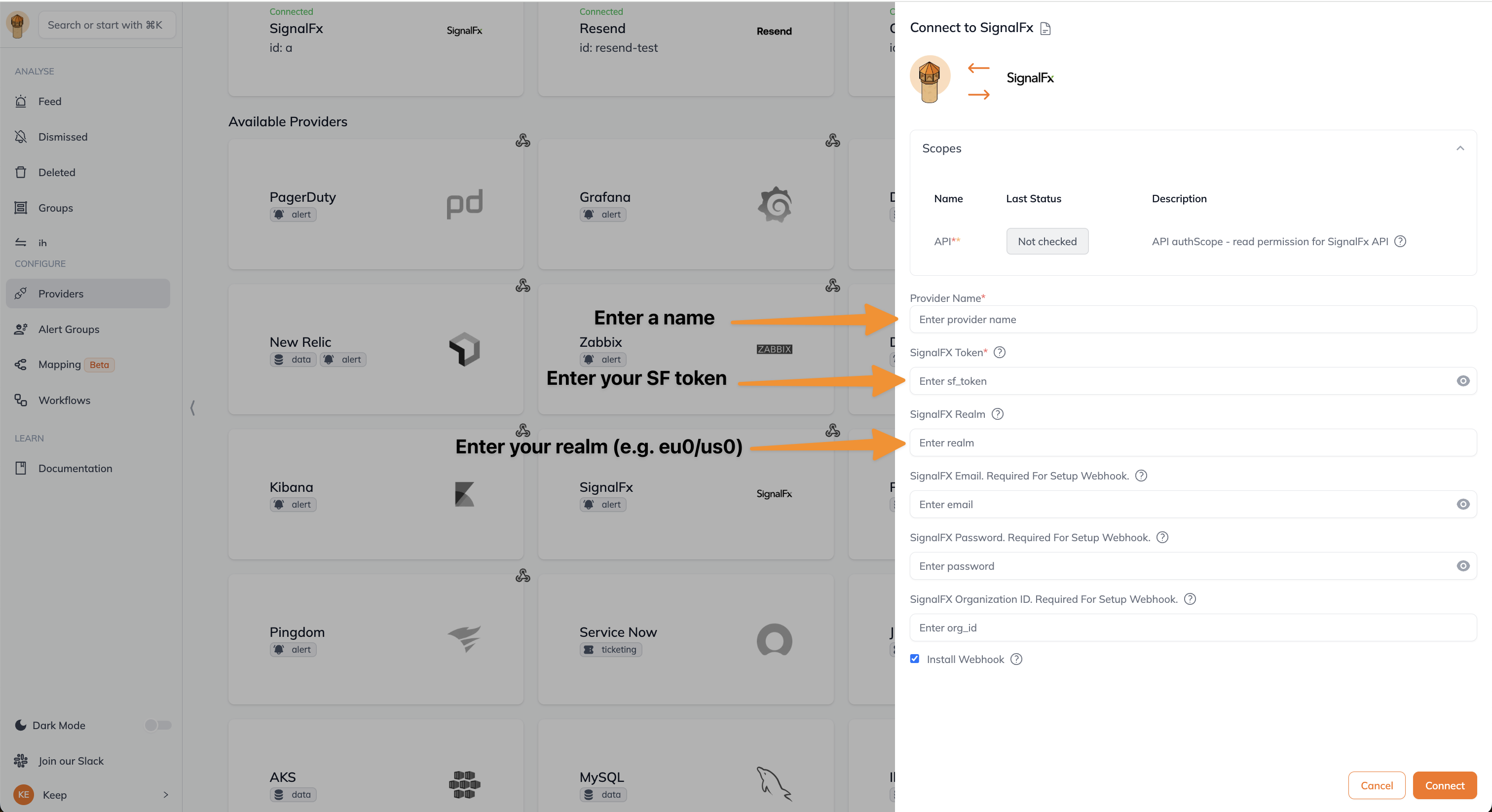
2. In Keep's UI, install SignalFx Provider:
### Pull
With this approach, Keep will pull alerts from SignalFx every time you refresh the console page.
1. SF token with read permissions - go to Settings -> Access Tokens -> New Token
2. In Keep's UI, install SignalFx Provider:
 ## Fingerprinting
Fingerprints in SignalFx calculated based on (incidentId, detectorId).
## Webhook Integration Modifications
The automatic webhook integration gains access to the `API` authScope, which gives Keep the ability to read and write to the SignalFx API.
## Authentication
This provider requires authentication.
* **sf\_token**: SignalFX token (required: True, sensitive: True)
* **realm**: SignalFX Realm (required: False, sensitive: False)
* **email**: SignalFX email. Required for setup webhook. (required: False, sensitive: True)
* **password**: SignalFX password. Required for setup webhook. (required: False, sensitive: True)
* **org\_id**: SignalFX organization ID. Required for setup webhook. (required: False, sensitive: False)
Certain scopes may be required to perform specific actions or queries via the provider. Below is a summary of relevant scopes and their use cases:
* **API**: API authScope - read permission for SignalFx API (mandatory) ([Documentation](https://dev.splunk.com/observability/reference/api/org_tokens/latest#endpoint-create-single-token))
## In workflows
This provider can't be used as a "step" or "action" in workflows. If you want to use it, please let us know by creating an issue in the [GitHub repository](https://github.com/keephq/keep/issues).
## Useful Links
* [SignalFx Webhook](https://docs.splunk.com/observability/en/admin/notif-services/webhook.html#webhook2)
## Fingerprinting
Fingerprints in SignalFx calculated based on (incidentId, detectorId).
## Webhook Integration Modifications
The automatic webhook integration gains access to the `API` authScope, which gives Keep the ability to read and write to the SignalFx API.
## Authentication
This provider requires authentication.
* **sf\_token**: SignalFX token (required: True, sensitive: True)
* **realm**: SignalFX Realm (required: False, sensitive: False)
* **email**: SignalFX email. Required for setup webhook. (required: False, sensitive: True)
* **password**: SignalFX password. Required for setup webhook. (required: False, sensitive: True)
* **org\_id**: SignalFX organization ID. Required for setup webhook. (required: False, sensitive: False)
Certain scopes may be required to perform specific actions or queries via the provider. Below is a summary of relevant scopes and their use cases:
* **API**: API authScope - read permission for SignalFx API (mandatory) ([Documentation](https://dev.splunk.com/observability/reference/api/org_tokens/latest#endpoint-create-single-token))
## In workflows
This provider can't be used as a "step" or "action" in workflows. If you want to use it, please let us know by creating an issue in the [GitHub repository](https://github.com/keephq/keep/issues).
## Useful Links
* [SignalFx Webhook](https://docs.splunk.com/observability/en/admin/notif-services/webhook.html#webhook2)