> ## Documentation Index
> Fetch the complete documentation index at: https://docs.keephq.dev/llms.txt
> Use this file to discover all available pages before exploring further.
# Linked providers
> Understanding linked vs connected providers in Keep
# Linked providers
In Keep, providers can be either "connected" or "linked." Understanding the difference is important for proper alert routing and management.
 ## Connected vs linked providers
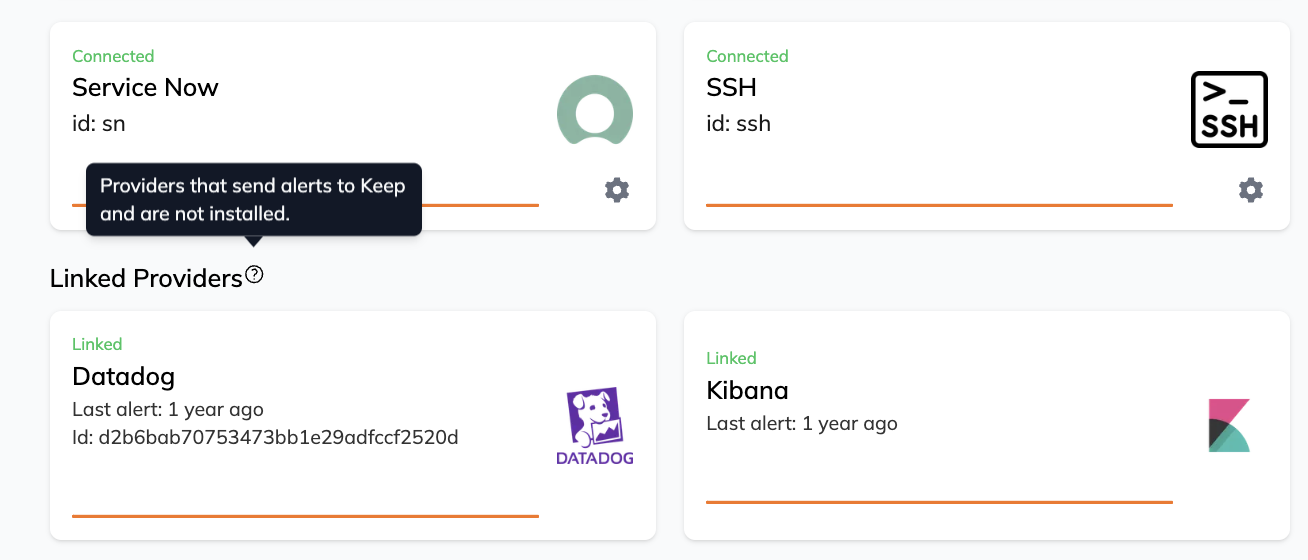
* **Connected Providers**: These are providers that have been explicitly configured in Keep through the UI or API. They have full provider configuration and authentication details.
* **Linked Providers**: These are providers that send alerts to Keep without being explicitly connected. They appear automatically when Keep receives alerts from them through webhooks or push mechanisms.
## How linking works
When Keep receives alerts from an unconnected provider (like Prometheus pushing alerts), it automatically creates a "linked" provider entry. This allows you to:
* Track which systems are sending alerts
* See when Keep last received an alert
* Apply deduplication rules specific to that provider
## Attaching alerts to connected providers
If you have a connected provider and want to associate incoming alerts with it instead of creating a linked provider, add the `provider_id` query parameter to the webhook URL.
For example, with Prometheus AlertManager:
```yaml theme={null}
alertmanager:
config:
receivers:
- name: "keep"
webhook_configs:
- url: "https://api.keephq.dev/alerts/event/prometheus?provider_id=your_provider_id"
```
Or with other webhook-based integrations:
```bash theme={null}
# Grafana webhook
https://api.keephq.dev/alerts/event/grafana?provider_id=grafana-prod
# Datadog webhook
https://api.keephq.dev/alerts/event/datadog?provider_id=datadog-main
# Generic webhook
https://api.keephq.dev/alerts/event/webhook?provider_id=custom-webhook
```
## Best practices
1. **For Production Systems**: It's recommended to use connected providers when possible, as they provide:
* Better authentication and security
* Access to provider-specific features
* Clearer audit trail
2. **For Testing/Development**: Linked providers can be useful for:
* Quick prototyping
* Testing alert flows
* Temporary integrations
3. **Converting Linked to Connected**: If you regularly receive alerts from a linked provider, consider:
* Setting up a proper provider connection
* Using the `provider_id` parameter to attach alerts to the connected provider
## Limitations
Linked providers:
* Can't be used to pull alerts or data
* Don't have authentication details
* Can't be used for provider-specific actions
* May have limited deduplication capabilities
For full capabilities, consider converting linked providers to connected providers when they become part of your permanent alerting infrastructure.
## Connected vs linked providers
* **Connected Providers**: These are providers that have been explicitly configured in Keep through the UI or API. They have full provider configuration and authentication details.
* **Linked Providers**: These are providers that send alerts to Keep without being explicitly connected. They appear automatically when Keep receives alerts from them through webhooks or push mechanisms.
## How linking works
When Keep receives alerts from an unconnected provider (like Prometheus pushing alerts), it automatically creates a "linked" provider entry. This allows you to:
* Track which systems are sending alerts
* See when Keep last received an alert
* Apply deduplication rules specific to that provider
## Attaching alerts to connected providers
If you have a connected provider and want to associate incoming alerts with it instead of creating a linked provider, add the `provider_id` query parameter to the webhook URL.
For example, with Prometheus AlertManager:
```yaml theme={null}
alertmanager:
config:
receivers:
- name: "keep"
webhook_configs:
- url: "https://api.keephq.dev/alerts/event/prometheus?provider_id=your_provider_id"
```
Or with other webhook-based integrations:
```bash theme={null}
# Grafana webhook
https://api.keephq.dev/alerts/event/grafana?provider_id=grafana-prod
# Datadog webhook
https://api.keephq.dev/alerts/event/datadog?provider_id=datadog-main
# Generic webhook
https://api.keephq.dev/alerts/event/webhook?provider_id=custom-webhook
```
## Best practices
1. **For Production Systems**: It's recommended to use connected providers when possible, as they provide:
* Better authentication and security
* Access to provider-specific features
* Clearer audit trail
2. **For Testing/Development**: Linked providers can be useful for:
* Quick prototyping
* Testing alert flows
* Temporary integrations
3. **Converting Linked to Connected**: If you regularly receive alerts from a linked provider, consider:
* Setting up a proper provider connection
* Using the `provider_id` parameter to attach alerts to the connected provider
## Limitations
Linked providers:
* Can't be used to pull alerts or data
* Don't have authentication details
* Can't be used for provider-specific actions
* May have limited deduplication capabilities
For full capabilities, consider converting linked providers to connected providers when they become part of your permanent alerting infrastructure.