> ## Documentation Index
> Fetch the complete documentation index at: https://docs.keephq.dev/llms.txt
> Use this file to discover all available pages before exploring further.
# Provider methods
Provider methods are additional capabilities that providers expose beyond the basic `query` and `notify` capabilities ([read more here](/providers/adding-a-new-provider#basics)). These methods allow you to interact with the provider's API in more specific ways, enabling richer integrations and automation capabilities.
## What are provider methods?
Developers define provider methods using the `PROVIDER_METHODS` list in each provider class. They represent specific actions or queries that you can perform through the provider's API. These methods extend the basic capabilities of providers beyond simple notifications and queries.
 For example, a monitoring service provider might expose methods to:
* Mute/unmute alerts
* Get detailed traces
* Search for specific metrics
* Modify monitoring configurations
## Using provider methods
You can access provider methods through:
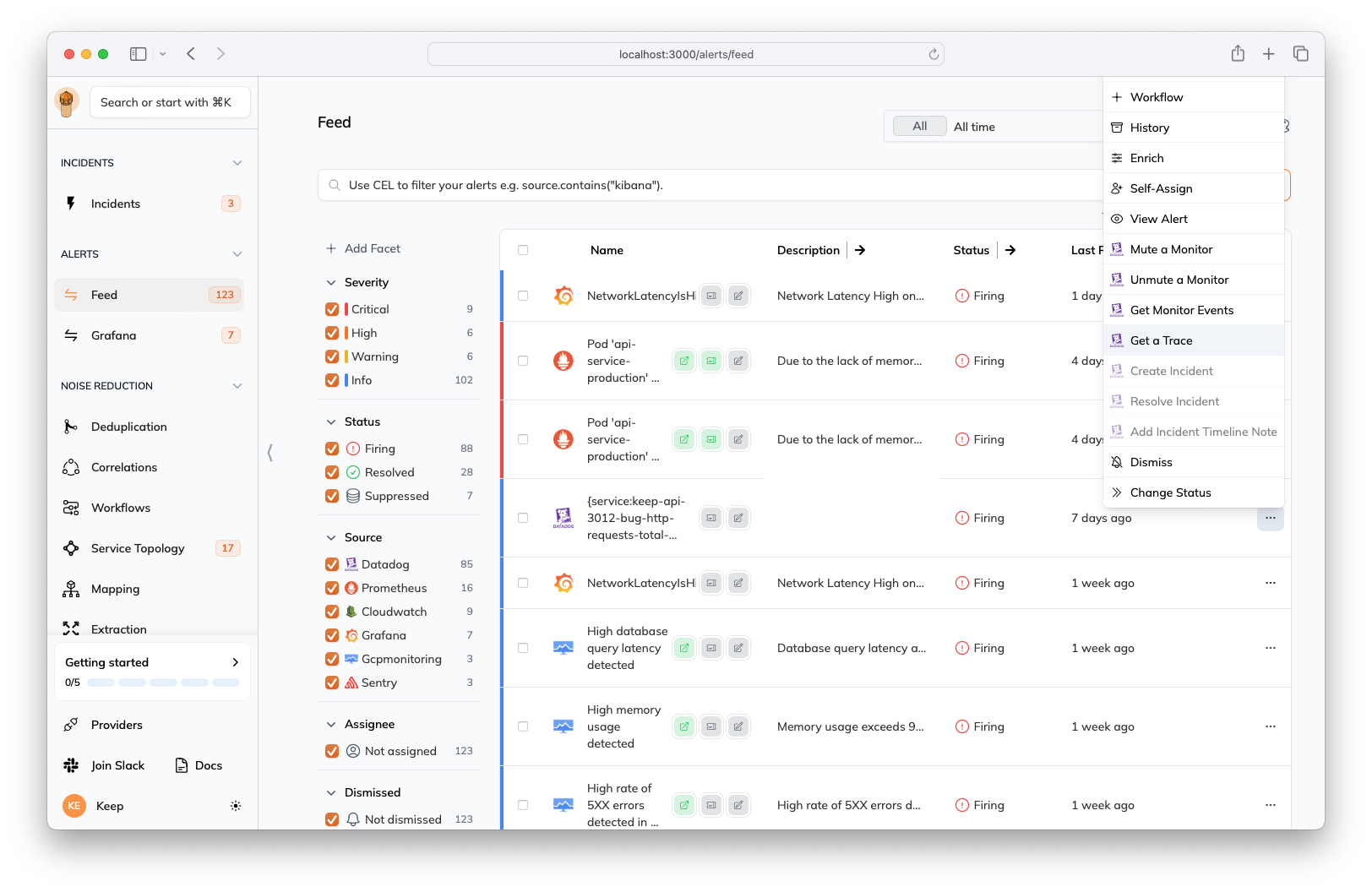
* Keep's platform interface via the alert action menu
* Keep's smart AI assistant (for example, "get traces for this alert")
* Keep's API
* Keep's workflows
### Via UI
Methods appear in the alert action menu when available for the alert's source provider:
For example, a monitoring service provider might expose methods to:
* Mute/unmute alerts
* Get detailed traces
* Search for specific metrics
* Modify monitoring configurations
## Using provider methods
You can access provider methods through:
* Keep's platform interface via the alert action menu
* Keep's smart AI assistant (for example, "get traces for this alert")
* Keep's API
* Keep's workflows
### Via UI
Methods appear in the alert action menu when available for the alert's source provider:
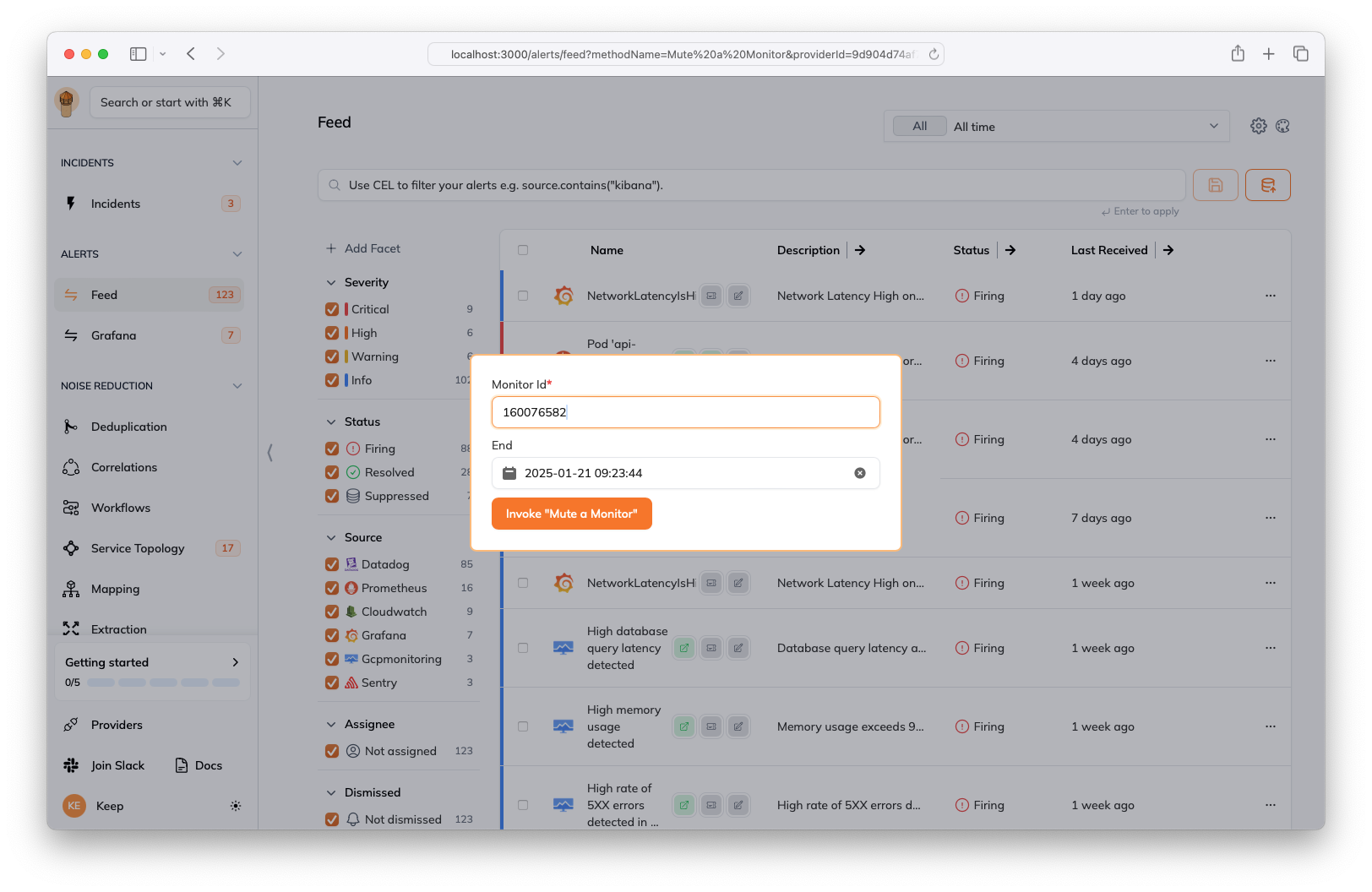 The form is automatically populated with the parameters required by the
method, if they're available in the alert.
### Via AI assistant
Keep's AI assistant can automatically discover and invoke provider methods based on natural language requests by understanding multiple contexts:
The form is automatically populated with the parameters required by the
method, if they're available in the alert.
### Via AI assistant
Keep's AI assistant can automatically discover and invoke provider methods based on natural language requests by understanding multiple contexts:
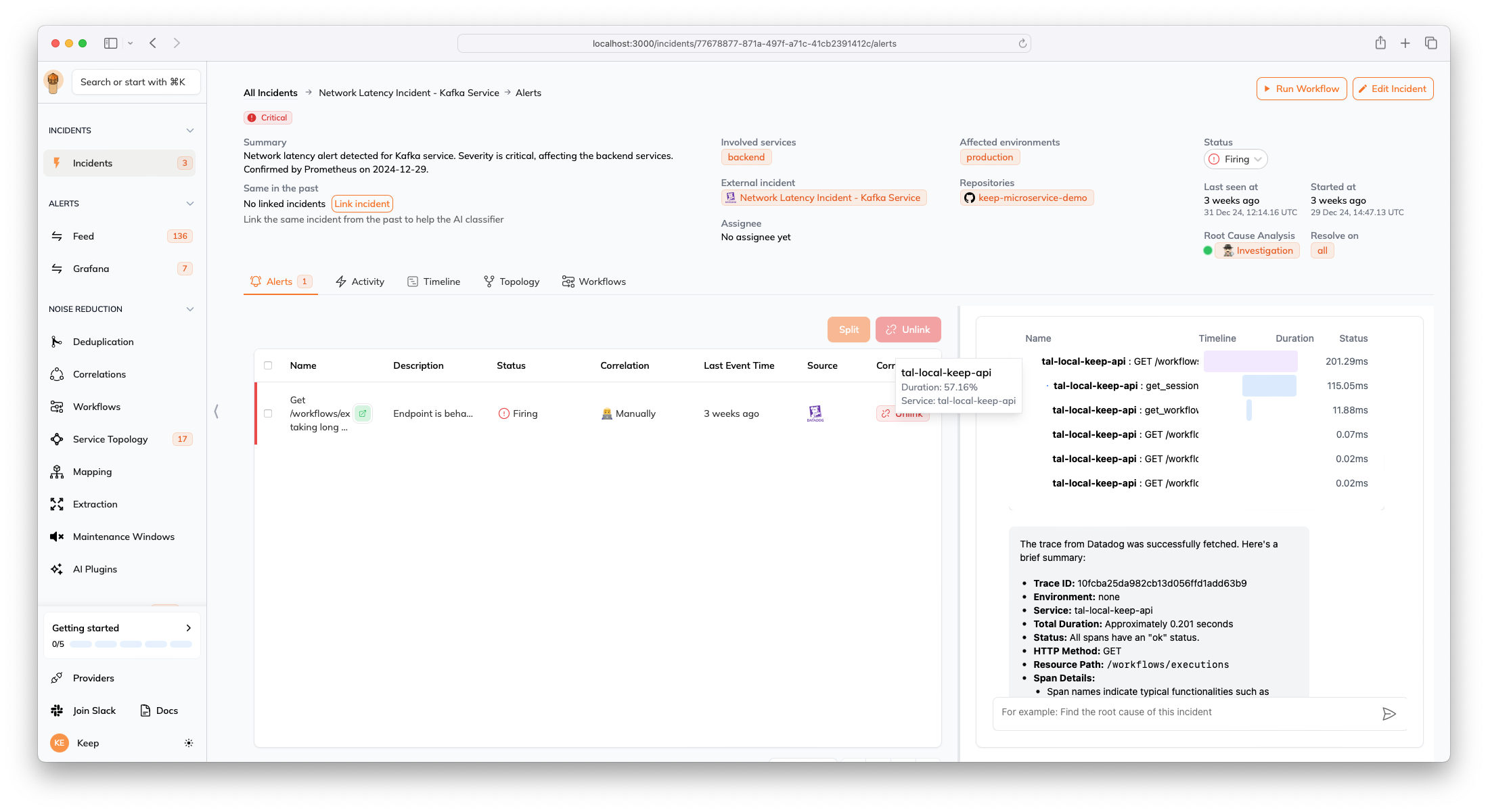 1. **Alert Context**: The AI understands:
* The alert's source provider
* Alert metadata and attributes
* Related services and applications
* Current alert status and severity
2. **Provider Context**: The AI knows:
* Which providers you have connected to your account
* Available methods for each provider
* Required parameters and their types
* Method descriptions and capabilities
3. **Historical Context**: The AI learns from:
* Similar past incidents
* Previously successful method invocations
* Common patterns in alert resolution
For example:
```text theme={null}
User: Can you get the traces for this alert?
Assistant: I see this alert came from Datadog. I'll use the Datadog provider's
get_traces method to fetch the traces. I'll use the trace_id from the alert's
metadata: abc-123...
User: This alert seems related to high latency. Can you help investigate?
Assistant: I'll help investigate the latency issue. Since this is a Datadog alert,
I can:
1. Get recent traces using search_traces() to look for slow requests
2. Fetch metrics using get_metrics() to check system performance
3. Look for related logs using search_logs()
Would you like me to start with any of these?
```
The AI assistant automatically:
1. Identifies relevant provider methods
2. Extracts required parameters from context
3. Suggests appropriate actions based on the alert type
4. Chains multiple methods for comprehensive investigation
### Via API
```python theme={null}
# Example using a Datadog provider method to mute a monitor
response = await api.post(
f"/providers/{provider_id}/invoke/mute_monitor",
{"monitor_id": "abc123", "duration": 3600}
)
```
## Adding new provider methods
To add a new method to your provider:
1. Define the method in your provider class (must be an instance method):
```python theme={null}
def get_traces(self, trace_id: str) -> dict:
"""Get trace details from the provider.
Args:
trace_id (str): The ID of the trace to retrieve
Returns:
dict: The trace details
"""
# Implementation
pass
```
2. Add method metadata to `PROVIDER_METHODS`:
```python theme={null}
from keep.providers.models.provider_method import ProviderMethod
PROVIDER_METHODS = [
ProviderMethod(
name="Get Traces",
description="Retrieve trace details",
func_name="get_traces",
type="view", # 'view' or 'action'
scopes=["traces:read"], # Required provider scopes
category="Observability", # Optional category for grouping methods
)
]
```
Note: The `func_params` field is automatically populated by Keep through reflection of the method signature, so you don't need to define it manually.
Provider methods must be instance methods (not static or class methods) of the provider class. The method signature is automatically inspected to generate UI forms and parameter validation.
### Complete example
Here's a complete example of a provider with custom methods:
```python theme={null}
class MonitoringProvider(BaseProvider):
PROVIDER_DISPLAY_NAME = "Monitoring Service"
PROVIDER_METHODS = [
ProviderMethod(
name="Mute Alert",
description="Mute an alert for a specified duration",
func_name="mute_alert",
type="action",
scopes=["alerts:write"],
category="Alert Management",
),
ProviderMethod(
name="Get Metrics",
description="Retrieve metrics for a service",
func_name="get_metrics",
type="view",
scopes=["metrics:read"],
category="Observability",
),
]
def mute_alert(self, alert_id: str, duration_minutes: int = 60) -> dict:
"""
Mute an alert for the specified duration.
Args:
alert_id: The ID of the alert to mute
duration_minutes: Duration to mute in minutes (default: 60)
Returns:
dict: Confirmation of the mute action
"""
# Implementation here
response = self._api_call(f"/alerts/{alert_id}/mute",
{"duration": duration_minutes})
return {"success": True, "muted_until": response["muted_until"]}
def get_metrics(self, service_name: str, metric_type: str,
time_range: str = "1h") -> list:
"""
Get metrics for a specific service.
Args:
service_name: Name of the service
metric_type: Type of metric (cpu, memory, latency, etc.)
time_range: Time range for metrics (default: "1h")
Returns:
list: List of metric data points
"""
# Implementation here
return self._query(f"metrics.{metric_type}",
service=service_name,
range=time_range)
```
### Method types
* **view**: Returns data for display (for example, getting traces, metrics)
* **action**: Performs an action (for example, muting an alert, creating a ticket)
### Parameter types
Supported parameter types for provider methods:
* `str`: String input field
* `int`: Numeric input field
* `float`: Decimal number input field
* `bool`: Boolean checkbox
* `datetime`: Date/time picker
* `dict`: JSON object input
* `list`: Array/list input
* `Literal`: Dropdown with predefined values
* `Optional[type]`: Optional parameter of the specified type
Example with different parameter types:
```python theme={null}
from typing import Optional, Literal
from datetime import datetime
def advanced_query(
self,
metric_name: str, # Required string
time_range: Literal["1h", "6h", "24h", "7d"] = "1h", # Dropdown with options
include_metadata: bool = False, # Boolean checkbox
limit: Optional[int] = None, # Optional integer
start_time: Optional[datetime] = None, # Optional datetime picker
) -> dict:
"""Query metrics with advanced filtering options."""
# Implementation
pass
```
### Auto-discovery
Keep automatically inspects provider classes to:
1. Discover available methods
2. Extract parameter information
3. Generate UI components
4. Enable AI understanding of method capabilities
## Best practices
1. **Clear Documentation**: Provide detailed docstrings for methods
2. **Type Hints**: Use Python type hints for parameters
3. **Error Handling**: Return clear error messages
4. **Scopes**: Define minimum required scopes
5. **Validation**: Validate parameters before execution
## Limitations
* Currently supports only synchronous methods
* The supported parameter types are limited to basic types
* Methods must be instance methods of the provider class
* Methods are automatically discovered through reflection
* Keep validates parameter types based on type hints
1. **Alert Context**: The AI understands:
* The alert's source provider
* Alert metadata and attributes
* Related services and applications
* Current alert status and severity
2. **Provider Context**: The AI knows:
* Which providers you have connected to your account
* Available methods for each provider
* Required parameters and their types
* Method descriptions and capabilities
3. **Historical Context**: The AI learns from:
* Similar past incidents
* Previously successful method invocations
* Common patterns in alert resolution
For example:
```text theme={null}
User: Can you get the traces for this alert?
Assistant: I see this alert came from Datadog. I'll use the Datadog provider's
get_traces method to fetch the traces. I'll use the trace_id from the alert's
metadata: abc-123...
User: This alert seems related to high latency. Can you help investigate?
Assistant: I'll help investigate the latency issue. Since this is a Datadog alert,
I can:
1. Get recent traces using search_traces() to look for slow requests
2. Fetch metrics using get_metrics() to check system performance
3. Look for related logs using search_logs()
Would you like me to start with any of these?
```
The AI assistant automatically:
1. Identifies relevant provider methods
2. Extracts required parameters from context
3. Suggests appropriate actions based on the alert type
4. Chains multiple methods for comprehensive investigation
### Via API
```python theme={null}
# Example using a Datadog provider method to mute a monitor
response = await api.post(
f"/providers/{provider_id}/invoke/mute_monitor",
{"monitor_id": "abc123", "duration": 3600}
)
```
## Adding new provider methods
To add a new method to your provider:
1. Define the method in your provider class (must be an instance method):
```python theme={null}
def get_traces(self, trace_id: str) -> dict:
"""Get trace details from the provider.
Args:
trace_id (str): The ID of the trace to retrieve
Returns:
dict: The trace details
"""
# Implementation
pass
```
2. Add method metadata to `PROVIDER_METHODS`:
```python theme={null}
from keep.providers.models.provider_method import ProviderMethod
PROVIDER_METHODS = [
ProviderMethod(
name="Get Traces",
description="Retrieve trace details",
func_name="get_traces",
type="view", # 'view' or 'action'
scopes=["traces:read"], # Required provider scopes
category="Observability", # Optional category for grouping methods
)
]
```
Note: The `func_params` field is automatically populated by Keep through reflection of the method signature, so you don't need to define it manually.
Provider methods must be instance methods (not static or class methods) of the provider class. The method signature is automatically inspected to generate UI forms and parameter validation.
### Complete example
Here's a complete example of a provider with custom methods:
```python theme={null}
class MonitoringProvider(BaseProvider):
PROVIDER_DISPLAY_NAME = "Monitoring Service"
PROVIDER_METHODS = [
ProviderMethod(
name="Mute Alert",
description="Mute an alert for a specified duration",
func_name="mute_alert",
type="action",
scopes=["alerts:write"],
category="Alert Management",
),
ProviderMethod(
name="Get Metrics",
description="Retrieve metrics for a service",
func_name="get_metrics",
type="view",
scopes=["metrics:read"],
category="Observability",
),
]
def mute_alert(self, alert_id: str, duration_minutes: int = 60) -> dict:
"""
Mute an alert for the specified duration.
Args:
alert_id: The ID of the alert to mute
duration_minutes: Duration to mute in minutes (default: 60)
Returns:
dict: Confirmation of the mute action
"""
# Implementation here
response = self._api_call(f"/alerts/{alert_id}/mute",
{"duration": duration_minutes})
return {"success": True, "muted_until": response["muted_until"]}
def get_metrics(self, service_name: str, metric_type: str,
time_range: str = "1h") -> list:
"""
Get metrics for a specific service.
Args:
service_name: Name of the service
metric_type: Type of metric (cpu, memory, latency, etc.)
time_range: Time range for metrics (default: "1h")
Returns:
list: List of metric data points
"""
# Implementation here
return self._query(f"metrics.{metric_type}",
service=service_name,
range=time_range)
```
### Method types
* **view**: Returns data for display (for example, getting traces, metrics)
* **action**: Performs an action (for example, muting an alert, creating a ticket)
### Parameter types
Supported parameter types for provider methods:
* `str`: String input field
* `int`: Numeric input field
* `float`: Decimal number input field
* `bool`: Boolean checkbox
* `datetime`: Date/time picker
* `dict`: JSON object input
* `list`: Array/list input
* `Literal`: Dropdown with predefined values
* `Optional[type]`: Optional parameter of the specified type
Example with different parameter types:
```python theme={null}
from typing import Optional, Literal
from datetime import datetime
def advanced_query(
self,
metric_name: str, # Required string
time_range: Literal["1h", "6h", "24h", "7d"] = "1h", # Dropdown with options
include_metadata: bool = False, # Boolean checkbox
limit: Optional[int] = None, # Optional integer
start_time: Optional[datetime] = None, # Optional datetime picker
) -> dict:
"""Query metrics with advanced filtering options."""
# Implementation
pass
```
### Auto-discovery
Keep automatically inspects provider classes to:
1. Discover available methods
2. Extract parameter information
3. Generate UI components
4. Enable AI understanding of method capabilities
## Best practices
1. **Clear Documentation**: Provide detailed docstrings for methods
2. **Type Hints**: Use Python type hints for parameters
3. **Error Handling**: Return clear error messages
4. **Scopes**: Define minimum required scopes
5. **Validation**: Validate parameters before execution
## Limitations
* Currently supports only synchronous methods
* The supported parameter types are limited to basic types
* Methods must be instance methods of the provider class
* Methods are automatically discovered through reflection
* Keep validates parameter types based on type hints